
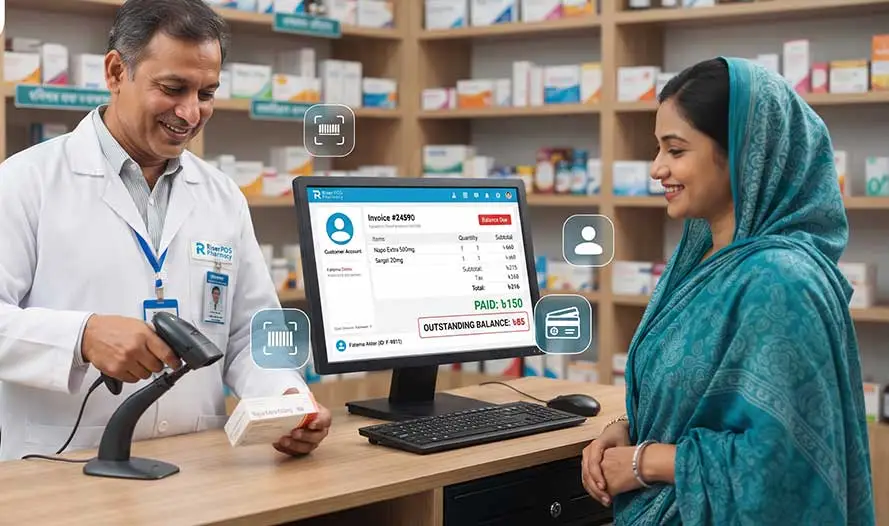
A pharmacy customer due is what a named regular customer still owes after you bill today’s medicines and record only part of the payment. The scan adds the pack to the invoice; the due is the remainder left on that customer’s account on the till—not a figure copied into a notebook at the end of the shift.
Riser POS Pharmacy is Dimdul’s point-of-sale for medicine shops in Bangladesh. The product hub is pharmacy POS Bangladesh; this article walks through barcode billing and customer credit on one counter. For supplier deliveries, see receive a pharmacy supplier delivery. For day-end sales and open customer balances, see the day’s pharmacy sales and open dues. This page does not cover restaurant billing or grocery shop tills.
What happens at a busy pharmacy counter?
Neighborhood pharmacies in Bangladesh often know the buyer by name. They sell packed boxes and strips with a barcode, sometimes apply a discount the owner approved, and let trusted customers pay part today. Without a till, the clerk scans fast but the due lives on a scrap of paper or in memory until someone asks “how much was left?”
Riser POS Pharmacy bills packed medicines with barcodes, tracks stock quantity, and stores customer purchase history and due balances on the same system. That is shop inventory and counter billing—not a hospital warehouse module and not insurance or third-party payer billing (those are not claimed on the published pharmacy page).
Notebook due vs the pharmacy till
| Question | Paper khata | Riser POS Pharmacy |
|---|---|---|
| Who owes what | Handwritten name and amount; easy to misread | Named customer record with open balance on the account |
| What was sold | Often “medicine ৳X” without the pack SKU | Scanned box or strip on the bill with quantity |
| Stock after the sale | Separate count or guess | Quantity reduces with the sale on the till |
| Partial payment today | Subtract in the margin; hope the clerk matches it | Cash or other payment type on the bill; remainder stays due |
| Next visit | Flip pages or ask who remembers | Customer history and dues in sales reports |
How to scan a medicine and record a customer due
Use this sequence on the counter (it matches the HowTo structured data on this page for search and AI summaries):
- Select the customer—open the regular’s profile so credit posts to the right name, not an anonymous walk-in ticket.
- Scan the pack—use a USB or Bluetooth scanner or the phone camera on the barcode; set quantity for boxes or strips.
- Confirm the line—check the pack in hand matches the product name on screen before you add the next item.
- Discount and payment—apply an item or bill discount you control; enter what they pay today and leave the rest as due on the same bill.
- Print and review—hand over the receipt; read the customer’s open balance from history or dues reports before the next sale.
Barcode scan: scanner or camera
Packed medicines are the fast path. Scanning beats typing generic names during a queue. Dimdul can connect a thermal printer, barcode scanner, or cash drawer as optional hardware; the mobile app is a full till, and Windows desktop is available for a counter PC, as described on Riser POS Pharmacy.
Grocery-style barcode billing for shelf goods is a different product—Riser POS Retail. Medicine barcode on this till is for the pharmacy counter only.
What the till records besides the due
Customer credit is one field on a bill that should already tie to stock and reports:
- Quantity and stock value after each sale, with low-stock alerts for reorder.
- Purchase history per customer when they return for refills or family accounts.
- Supplier purchases and amounts you still owe distributors—separate from customer dues.
- Shop expenses so profit is after rent and salaries, not sales alone.
- Sales, profit, inventory value, expenses, and dues downloadable or printable from reports.
Published plans on pricing (checked 7 October 2026) are Startup ৳1,000 (2 users, 200 products), Plus ৳2,000 (4 users, 500 products), and Monthly ৳2,500 (10 users, 1,500 products), plus ৳5,000 installation including domain, hosting, and training. Dimdul performs setup—there is no self-serve free trial.
Offline billing and when to call Dimdul
Essential selling can continue without internet; data syncs when the connection returns, depending on setup. That matters when broadband drops mid-queue but the regular still needs medicines on credit.
Ask Dimdul for a demo with one scanned strip, one partial payment, and one dues report before sign-off. See business types for how pharmacy fits beside restaurant, retail, and dealer installs. Hardware scope is on hardware.
Questions pharmacy owners ask
A pharmacy customer due is the unpaid balance left on a named regular customer's account after you bill scanned medicines and record a partial payment on the same receipt. Riser POS Pharmacy keeps that balance on the till instead of a separate notebook.
Yes. You can scan packed medicines with a USB or Bluetooth barcode scanner or the phone camera, set quantity on the bill, and print the receipt. Confirm the pack on the counter matches the SKU on screen.
No. Riser POS Pharmacy is Dimdul's till for medicine shops: barcode billing, stock quantity, supplier purchases, and customer dues. Walk-in grocery billing lives on Riser POS Retail.
Yes. Essential selling can continue offline on the mobile app. Data syncs when the connection returns, depending on setup. Ask Dimdul to demo one credit sale before go-live.
The published pharmacy page describes stock quantity, purchases, low-stock alerts, and sales. Batch or expiry registers, narcotics logs, and DGDA reporting are not published there. Ask Dimdul what your install includes.
WhatsApp Dimdul how many regular customers run on credit and how many SKUs you scan at go-live. Message on WhatsApp, open Riser POS Pharmacy, or compare plans on pricing.