
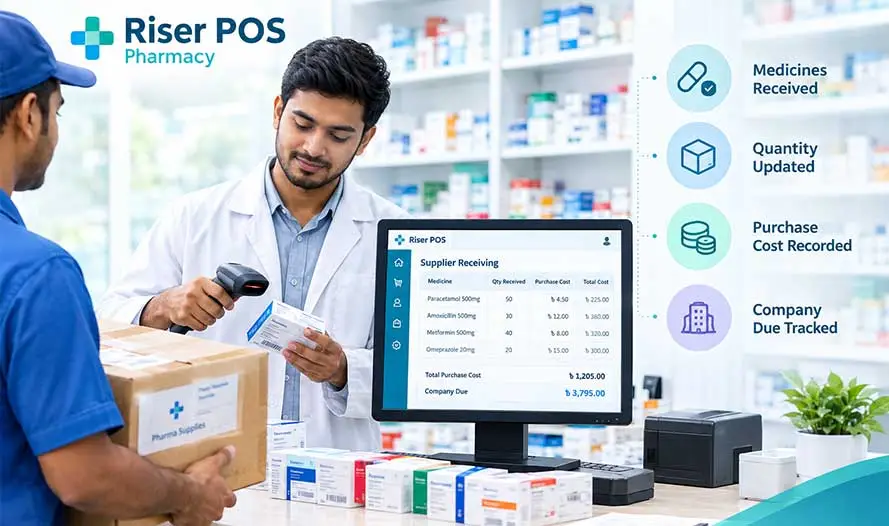
Pharmacy supplier receiving is recording a distributor’s delivery on the same till you use for sales: which medicines arrived, in what quantity, at what purchase cost, and how much you still owe that company. Stock quantity should increase when you save the purchase—not when someone later guesses from empty shelves.
Riser POS Pharmacy is Dimdul’s medicine-shop counter in Bangladesh. The product hub is Riser POS Pharmacy; this article is the receiving walkthrough only. After stock is on the books, see scanning a medicine and recording the customer due. Day-end sales and open customer balances are in the day’s pharmacy sales and open dues. This page is not dealer godown software or grocery retail receiving.
What is pharmacy supplier receiving?
When the company van drops cartons at a neighborhood pharmacy, the owner needs one record that ties the challan to shelf stock and supplier balance. Receiving is that purchase entry: supplier name, line items, costs, and payment or credit on the distributor—not a second notebook that only the manager reads on Sunday.
On Riser POS Pharmacy, distributor purchases sit beside barcode billing and customer dues on one install. That is shop-scale inventory, not a hospital warehouse module and not the route dispatch desk described in distributor management software for wholesale counters.
Paper challan vs purchase entry on the till
| Question | Paper stack | Riser POS Pharmacy |
|---|---|---|
| What arrived today | Challan in a folder; easy to lose a page | Purchase lines with SKU, quantity, and cost |
| Stock on the shelf | Updated when someone counts “later” | Quantity increases when the purchase is saved |
| What you owe the company | Margin note on the invoice | Supplier due on the same supplier record |
| Link to counter sales | Not connected | Barcode billing reduces the same quantity figures |
| Reports | Manual add-up | Purchases, stock value, and dues in till reports |
How to receive a pharmacy supplier delivery
Use this sequence when the delivery is on the counter (it matches the HowTo structured data on this page for search and AI summaries):
- Select the supplier—the distributor or company on today’s challan, so due and history stay on the right name.
- Enter each line—product or SKU, quantity received, and unit cost from the invoice; match box, strip, or pack size to your catalog.
- Check the invoice total—the till total should match the distributor bill before you post.
- Record payment or due—enter what you paid today; leave the rest as supplier due if you buy on credit.
- Confirm stock before sales—spot-check fast movers, then open the counter for barcode billing.
What to match on the delivery
Receiving errors show up as wrong shelf counts or wrong supplier balances. On each delivery, confirm:
- Supplier name matches the company that will collect payment.
- Each line uses the SKU or product name staff will scan at sale time.
- Quantity is in the unit you sell—box, strip, or piece—as Dimdul set up at install.
- Unit cost reflects the invoice, so profit reports stay honest.
- Invoice total equals the sum of lines plus any discount the distributor applied.
- Payment today versus open due matches what you agreed with the company.
The published pharmacy till tracks stock quantity, purchases, and low-stock alerts. Batch or expiry registers are not described on the product page—ask Dimdul if your install records extra fields on purchase entry.
How receiving connects to stock and sales
Purchase entry is the inbound side of shop inventory; barcode billing is the outbound side. When a packed medicine sells, quantity should drop on the same SKU you received yesterday. Low-stock alerts and inventory value reports use those linked figures—see pharmacy POS features on the hub.
Customer credit is separate: supplier due is what you owe companies; customer due is what regular buyers owe you after a sale. The customer flow is in the customer due guide. Closing the day’s sales and open dues together are in the day’s pharmacy sales and open dues.
Published plans on pricing (checked 7 October 2026) are Startup ৳1,000, Plus ৳2,000, and Monthly ৳2,500 per month, plus ৳5,000 installation. Dimdul loads your catalog and walks through one purchase entry at setup.
Questions pharmacy owners ask
Pharmacy supplier receiving is recording a distributor delivery on the till: which medicines arrived, in what quantity, at what cost, and how much you still owe that supplier. Riser POS Pharmacy posts the purchase to shop stock on the same system you use for barcode billing.
Yes. A purchase entry increases quantity on hand for each SKU you receive. Sales at the counter then reduce that quantity when you bill scanned packs. Low-stock alerts use the same records.
Yes. Record the supplier, purchase amount, and any payment you make today; the remainder stays as supplier due on the pharmacy till, separate from customer credit on sales.
No. Dealer distributor software runs godown dispatch to route shops. Pharmacy supplier receiving is purchase entry for a medicine shop counter—one neighborhood pharmacy, not a wholesale desk.
The published pharmacy page describes stock quantity, purchases, low-stock alerts, and sales. Batch or expiry registers are not published there. Ask Dimdul what your install captures on purchase entry.
WhatsApp Dimdul how many suppliers you buy from and whether you receive on phone or desktop. Message on WhatsApp, open Riser POS Pharmacy, or compare plans on pricing.