Fast food guide

Fast food POS in Bangladesh

Riser POS is the restaurant till for a fast food counter in Bangladesh. A small counter starts on Startup at ৳1,000 a month. Plus is ৳2,000 a month when the kitchen needs a display for the combo ticket. Dimdul Ltd installs it nationwide. Support runs from Dhaka HQ, with teams in Chattogram and Cumilla. Prices checked 22 October 2026.

Updated 22 October 2026 · Walks one lunch sale on the Riser POS restaurant install: a chicken burger combo, the side and the drink on that same ticket, and dine-in or takeaway chosen before the kitchen sees it · QSR buying guides stay on Dimdul

Fast food counter during service

The floor What breaks on a fast food counter?

Three places a lunch line fails before the guest has paid.

Combo vs bag

Fast food fails in the gap between the shout and the bag. The guest says combo. The cashier rings a plain burger. Fries go into the next bag, and the 7UP lands on a stool while the takeaway guest is already at the door. The short drawer shows up after they have left, and the receipt in the bin does not say which drink was poured.

Dine-in or takeaway

Stools and a takeaway window run in the same minute. If dine-in or takeaway is picked after the kitchen has started, the pass plates a tray for a bag, or bags a meal that was supposed to stay. The ticket has to carry that choice before it leaves the counter.

When the line drops

Lunch broadband in Dhaka and Chattogram drops while people are still at the glass. A till that waits on the internet holds the next orders. Riser POS puts the side and the drink on the combo in one tap each, marks dine-in or takeaway on that ticket, and sends the same ticket to a kitchen printer or, on Plus, a kitchen display. The Android counter still bills if the network drops. A dining room with courses and a named table uses the restaurant table walk.

One sale How does one fast food order move from the first tap to the day's report?

Chicken burger combo, fries and 7UP, takeaway at the glass.

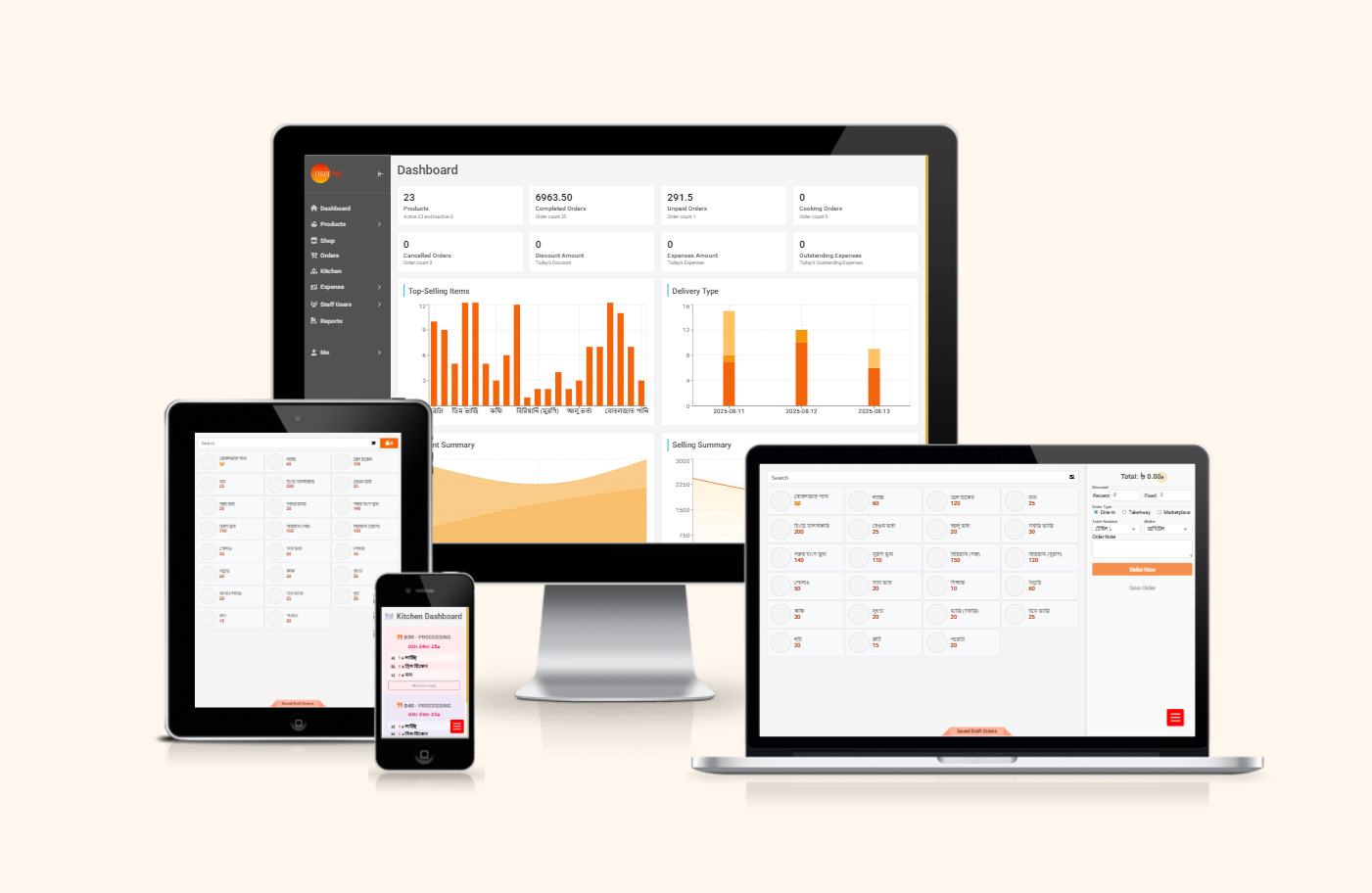
Riser POS billing screen on a tablet
  1. Tap the combo and modifiers

    The guest at the glass asks for a chicken burger combo, fries, and a 7UP, takeaway, with no mayo. The cashier taps Chicken burger combo, then the modifiers on that item. Fries is the side. 7UP is the drink. No mayo is how the burger is prepared. Each choice is one tap. The dining option on the same ticket is takeaway, chosen before the kitchen ticket prints. The next guest wants that combo with Coke and a stool, so the second ticket is dine-in. The fries and the 7UP stay on the ticket that named them, so the takeaway bag does not pick up the stool's Coke.

  2. Pay at the counter

    The money is taken at the counter before the bag is called. Cash, card, or mobile banking. The stool meal can close in that same step. The café guide is the sale that parks an open ticket, names it Table 2, and adds a brownie twenty minutes later.

  3. Send the kitchen ticket

    Startup, at ৳1,000 a month, sends a kitchen ticket to the printer. The pass reads chicken burger combo, fries, 7UP, no mayo, and takeaway, the same text that will be on the receipt. Plus, at ৳2,000 a month, can show that ticket on the kitchen display as well. A one-person fryer and a short menu can live on the printer. The display is for a lunch line where paper slips get swapped between the burger station and the drinks.

  4. Refunds and the day report

    If the 7UP was poured as Coke, the cashier refunds that item on the receipt, or the whole receipt, and rings the drink again. The till can refund the selected item or every item on the receipt. The day report then lists the combo that left the counter. Startup includes reports of what sold. Plus adds analytics reports. The next prep list for buns, fries, and bottles follows that list. If broadband drops while the line is still there, the Android till can still close the bill and sync when the connection returns.

  5. Tables, display, and stock

    A few stools can use table management, which is on Startup, when those seats need names. A takeaway window can leave the tables off the sale. The waiter app is on Startup for a runner. A one-person window stays on the till. QR orders, the host stand, and the waitlist are on Plus. Most counters skip them. If Saturday lunch already loses paper between the cashier and the fryer, the kitchen display on Plus is the screen you are buying. Plus also lists multi kitchen management, so a drink station and a burger station can each see the ticket. Ask on the demo whether that second screen is required, and whether fries and the bottle should count down with each combo. Gross profit shows when a recipe cost is set.

Pricing Which Riser POS plan fits a fast food counter?

Food businesses use the restaurant install. The fees below are the restaurant column on pricing. Prices checked 22 October 2026. Installation and training start at ৳5,000 one time on every plan. That fee covers domain, hosting, and till training. The final install number depends on outlets, hardware, and integrations. Hardware is quoted separately. This site does not take payment. Dimdul sets the till up. There is no self-serve free trial.

Startup

Small cafes and quick-service counters

৳1,000/mo
  • Core POS Billing (offline, mobile app, KOT, receipts)
  • Menu / Product Management
  • Table Management
  • Reports and VAT on bills
  • Multi Payment (cash, card, mobile banking)
  • Waiter App Support
Get Started

Pro

Add the modules you need on top of Plus

Custom
  • Everything in Plus
  • Table reservations, online orders, delivery apps
  • Online payment gateway (provider fees separate)
  • Accounts Management, multi-printer, assets
  • Reputation Management (from ৳1,500/mo)
  • Optional add-ons from ৳500/mo; quoted per module
Contact Sales

* Installation and training on every plan: from ৳5,000 one time (domain, hosting, and till training). Final fee depends on outlets, hardware, and integrations.

Startup at ৳1,000 a month is the small counter and the takeaway window. The published list is core POS billing (offline, mobile app, KOT, receipts), menu and product management, table management, reports and VAT on bills, multi payment (cash, card, mobile banking), and waiter app support. That list is the chicken burger sale: the side, the drink, and no mayo live in billing as modifiers, dine-in or takeaway is on the same ticket, and the kitchen ticket is the KOT. VAT can print on the receipt. Filing a return is not described on this page.

Plus at ৳2,000 a month is the lunch line that needs a kitchen display. It includes everything in Startup, then multi kitchen management (KDS), advanced inventory, staff role management, QR contactless orders, and analytics reports. The Plus card below also lists purchase tools and the audit log. Advanced inventory is where buns, fries, and bottles can move with the combo. Staff roles and the audit log show who refunded the 7UP when the cashier and the fryer are different people. Year one on Plus, before hardware, is the example the pricing page prints: ৳2,000 × 12 + ৳5,000 install = ৳29,000.

Pro is a custom package on top of Plus. It adds table reservations, online orders, and delivery apps, an online payment gateway with provider fees separate, accounts, multi-printer, and assets, reputation management from ৳1,500 a month, and optional add-ons from ৳500 a month, quoted per module. A counter that only runs walk-in lunch usually stops at Startup or Plus. Foodpanda or Pathao orders are typed onto the till. A delivery-app module, and a second outlet under one login, are Pro questions for the demo.

Scope What does this fast food page leave out?

This page is the Riser screen for a fast food counter: one combo with the side and the drink on the ticket, dine-in or takeaway chosen before the kitchen, payment at the glass, and the plan that includes the printer or the display.

Other floors

The coffee shop guide is a different floor. That pain is the opening rush, the usual order kept on a customer profile, and takeaway marked so the bar knows who is waiting at the door.

Crust, a half-and-half split, and extra toppings belong on the pizzeria guide, where the oven has to see the pie that was billed. Loose items, custom cakes, and daily trays belong in the bakery guide.

Not on this install

There is no self-order kiosk and no RFID settlement on this install. Calling the bag by a number is a demo question, and a token screen is not on this page. Mushak filing steps are not here. If a Mushak 6.3 report has to appear on a vendor's own page, that comparison is on Dimdul's restaurant guide. Riser prints the fee and the screens on this page: Startup ৳1,000 a month, Plus ৳2,000 a month, Pro custom, installation from ৳5,000. QSR buying guides stay on Dimdul.

Before the demo

On a demo, confirm the business type, the city, the branch count, and the printers: a kitchen printer, a receipt printer, or both. Say whether the lunch line needs the kitchen display, whether a drink station needs its own screen, and whether stools need table names. WhatsApp that list to Dimdul on 01538-004738 before the visit. The install is still the restaurant product. Full module lists stay on pricing. Every floor on the hub is on business types.

Before a demo What do fast food owners ask before a demo?

Riser POS is the restaurant till Dimdul Ltd installs for a fast food counter in Bangladesh. Startup is ৳1,000 a month for a small counter. Plus is ৳2,000 a month when the kitchen needs a display for the combo ticket. Prices checked 22 October 2026.

Fries and a 7UP are modifiers on the chicken burger combo, each chosen in one tap, with no mayo if the guest says it. Dine-in or takeaway is chosen on that same ticket before the kitchen ticket prints. Startup sends that text to the printer. Plus can also show the same ticket on the kitchen display. The receipt uses that ticket.

At the counter, in the same step as the order. Cash, card, or mobile banking closes the takeaway bag and the stool meal. A later item on a named open ticket is the café sale, and that walk is on the café guide. If broadband drops, the Android till can still close the bill and sync when the connection returns.

Startup at ৳1,000 a month covers billing, modifiers, the kitchen ticket, dine-in or takeaway on the ticket, and offline Android billing. Plus at ৳2,000 a month adds the kitchen display. Pro is a custom package and adds reservations, online orders, and delivery apps on top of Plus. Prices checked 22 October 2026.

This page is the fast food counter. The coffee shop guide covers the opening rush and a saved usual order. The pizzeria guide covers crust, a half-and-half split, and toppings before the oven. The restaurant page is the product install and the dining-room walk. QSR buying guides stay on Dimdul.

Updated 22 October 2026.